Meeting room scheduling mishaps like double bookings can derail productivity and create frustration among employees. Implementing an effective meeting room booking management system is crucial to ensure smooth operations, clear communication, and optimal use of shared spaces.
Below, we outline key strategies and best practices for avoiding double bookings and maintaining efficient meeting room management.
1. Utilise a Centralised Meeting Room Booking Management System
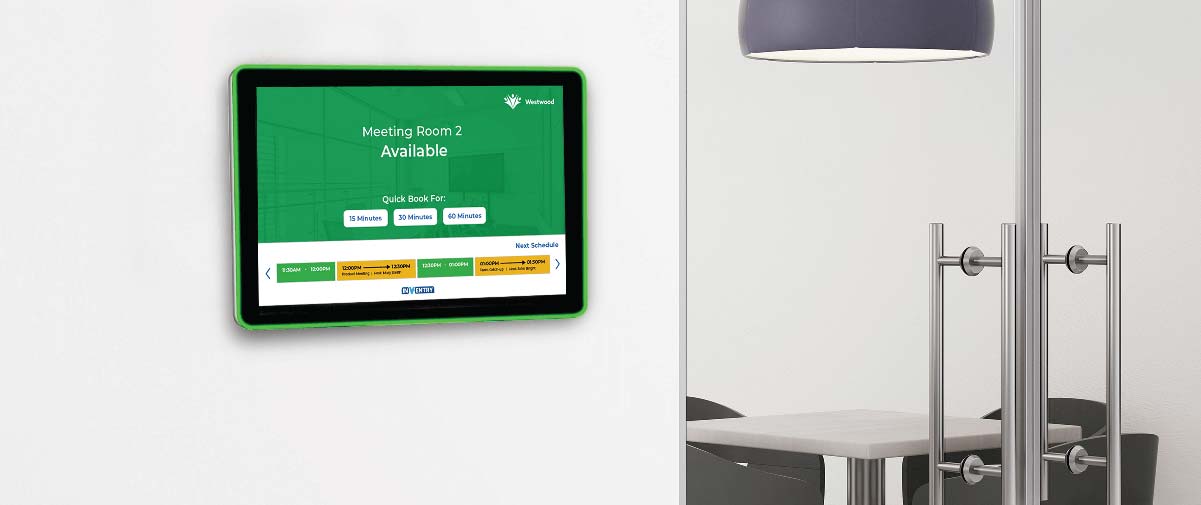
Centralised meeting room booking solutions, boardroom booking software serves as the cornerstone of effective room management processes, ensuring a seamless and efficient approach to organising spaces. By integrating all scheduling activities into a single platform, businesses and institutions can significantly enhance their room management processes. This consolidation eliminates the risk of duplicate bookings, which often arise due to miscommunication or reliance on outdated manual procedures.
With a streamlined system in place, users also gain real-time visibility into room availability, preventing scheduling conflicts and improving overall efficiency. By adopting a centralised approach, organisations can optimise their room management strategies, ensuring that meeting spaces are utilised effectively and without disruption.
2. Automate Scheduling with Real-Time Updates
Automation is a game-changer in meeting room management. A robust booking system should provide real-time updates, notifying users immediately if a space is unavailable and suggesting alternatives. Real-time notifications reduce the likelihood of human error while ensuring transparency.
Space booking systems come with the ability to send automated alerts and integrate with popular calendar tools like Outlook and Google Calendar for seamless scheduling.
3. Implement User Authentication and Access Controls
Access controls play a crucial role in room and workspace management by restricting who can book meeting spaces, ensuring that only authorised individuals can make reservations. This reduces the likelihood of unauthorised bookings, which often lead to scheduling conflicts and disrupt the efficient use of shared spaces.
Within a comprehensive meeting room management system, authentication further enhances accountability by requiring users to verify their identity before accessing the platform. By doing so, individuals can securely view and manage their bookings, making it easier to track reservations and prevent misuse. This streamlined approach to meeting room booking management helps organisations optimise space usage while maintaining order and efficiency.
4. Provide Clear Policies and Guidelines
EduEnsuring employees understand booking policies is essential for maintaining an efficient space management system. Clear policies help prevent scheduling conflicts and reduce confusion, allowing for a more streamlined process when reserving spaces.
Booking Duration Limits
One key aspect of meeting room management is setting clear expectations for booking duration limits. Employees should be aware of how long they can reserve a room and whether there are any restrictions on extending their booking. By defining these limits, organisations can ensure fair access to meeting spaces for all staff members.
Cancellation Policies
Another important guideline involves cancellation policies. Employees should know the proper procedures for cancelling a reservation, including any required notice period. This not only prevents unnecessary room shortages but also allows others to make use of available spaces.
Reporting Scheduling Conflicts
It is crucial to provide clear instructions on how to report scheduling conflicts. Whether it’s a double booking or an unauthorised reservation, having a straightforward process for addressing issues ensures that rooms are used efficiently and fairly
5. Regularly Audit and Optimise the System
Conducting routine evaluations helps identify areas for improvement and ensures that your meeting room management processes remain efficient and effective.
Make full use of the analytics tools available within your meeting room booking system to gain valuable insights into user behaviour. By analysing patterns such as peak booking times, frequent cancellations, and underutilised spaces, you can pinpoint inefficiencies and areas that require optimisation.
Use this data to refine your room management strategy, implementing adjustments that streamline usage and enhance overall accessibility.
6. Encourage Accountability
Ultimately, technology works best when supported by a workplace culture that values transparency and respect for shared resources. Encouraging employees to take responsibility for their bookings is key to maintaining an efficient Room Management system. Ask team members to double-check their reservations and report any discrepancies as soon as possible to avoid confusion and scheduling conflicts.
With the right strategies and tools in place, double bookings can become a thing of the past. A reliable meeting room booking management system prevents clashes while promoting productivity and collaboration. By centralising bookings, automating real-time updates, and fostering a sense of accountability, your organisation can ensure seamless meeting room management, allowing teams to focus on what truly matters – effective meetings and teamwork.
How InVentry Can Help
For more information on how InVentry can transform your meeting room booking management system, learn more about our Space Bookings solution. Contact us today to understand how our space booking software can help your company or book a demo today.
Additional Reading:
Learn about Space Bookings in action in our Trafford Centre Case Study.
Streamlining Meeting Room Reservation Processes
Enhanced Collaboration With a Room Booking Solution
Meeting Room Management FAQs
1. What is a meeting room booking management system?
A meeting room booking management system is a digital platform that allows organisations to schedule, manage, and monitor the use of shared meeting spaces.
Instead of relying on spreadsheets, emails, or paper diaries, everything is handled in one central system. In practice, solutions like InVentry’s Space Bookings give teams real-time visibility of room availability, reduce double bookings, and ensure meeting spaces are used efficiently.
From experience, this is the biggest shift organisations make when moving from manual to digital scheduling – visibility and control improve immediately.
2. How does a meeting room booking system prevent double bookings?
Double bookings are usually caused by outdated calendars, manual errors, or lack of visibility.
A booking system prevents this by:
- showing real-time room availability
- blocking already reserved time slots automatically
- syncing with calendar tools like Outlook or Google Calendar
- updating bookings instantly across all users
With systems like InVentry Space Bookings, this happens automatically, meaning users can’t accidentally book the same room twice – the system physically prevents it.
3. Why is centralised meeting room management important?
Centralised meeting room management is important because it brings all bookings into one system rather than multiple disconnected calendars or spreadsheets.
In real workplace environments, decentralised booking often leads to:
- duplicate reservations
- unused or forgotten bookings
- confusion over availability
- inefficient use of space
A centralised system like InVentry provides a single source of truth, ensuring everyone is working from the same live data.
4. How does real-time scheduling improve meeting room efficiency?
Real-time scheduling ensures that every booking update is instantly visible to all users.
This improves efficiency by:
- eliminating booking delays
- reducing communication errors
- allowing instant room reallocation
- helping staff find alternative spaces quickly
In practice, this is one of the most valuable features in systems like InVentry Space Bookings, especially in busy environments where room demand changes throughout the day.
5. Why are user permissions and access controls important?
User permissions ensure that only authorised staff can book or modify meeting room reservations.
This is important because it:
- prevents unauthorised or accidental bookings
- improves accountability across teams
- ensures fair access to shared spaces
- reduces misuse of high-demand rooms
In structured systems like InVentry, permissions can be tailored by department, role, or location, helping organisations maintain full control over how spaces are used.
6. What policies should organisations set for meeting room bookings?
Clear booking policies help prevent confusion and ensure fair access to meeting spaces.
Most organisations define rules such as:
- maximum booking duration per meeting
- cancellation notice periods
- priority rules for certain teams or rooms
- procedures for reporting conflicts or issues
From experience, organisations that combine clear policies with digital booking systems see far fewer scheduling disputes and significantly better room utilisation.
7. How can data and analytics improve meeting room management?
Meeting room analytics help organisations understand how their spaces are actually being used.
Key insights often include:
- peak booking times
- frequently unused rooms
- no-show or cancellation trends
- overall space utilisation rates
With this data, organisations using systems like InVentry can optimise layouts, adjust availability, or repurpose underused rooms to improve efficiency.
8. How can organisations encourage better meeting room booking habits?
Encouraging accountability is just as important as the technology itself.
Best practices include:
- encouraging users to release unused bookings
- reminding staff to cancel meetings they no longer need
- promoting shared responsibility for room usage
- using automated reminders and notifications
In workplaces using InVentry Space Bookings, automated alerts help reinforce these behaviours without adding extra administrative burden.
9. What are the benefits of integrating meeting room booking software with calendar tools?
Integration with tools like Outlook or Google Calendar ensures that booking activity is consistent across all platforms.
Benefits include:
- synchronised schedules
- reduced manual input
- fewer conflicts between systems
- improved visibility for hybrid teams
In practice, integration is one of the most important features for adoption, because it fits into existing workflows rather than replacing them.
10. How does InVentry help with meeting room management?
InVentry’s Space Bookings solution helps organisations manage meeting rooms more effectively by providing:
- real-time room availability
- centralised booking management
- automated scheduling updates
- integration with existing calendar systems
- usage analytics and reporting
It reduces administrative workload while improving visibility, efficiency, and collaboration across teams.