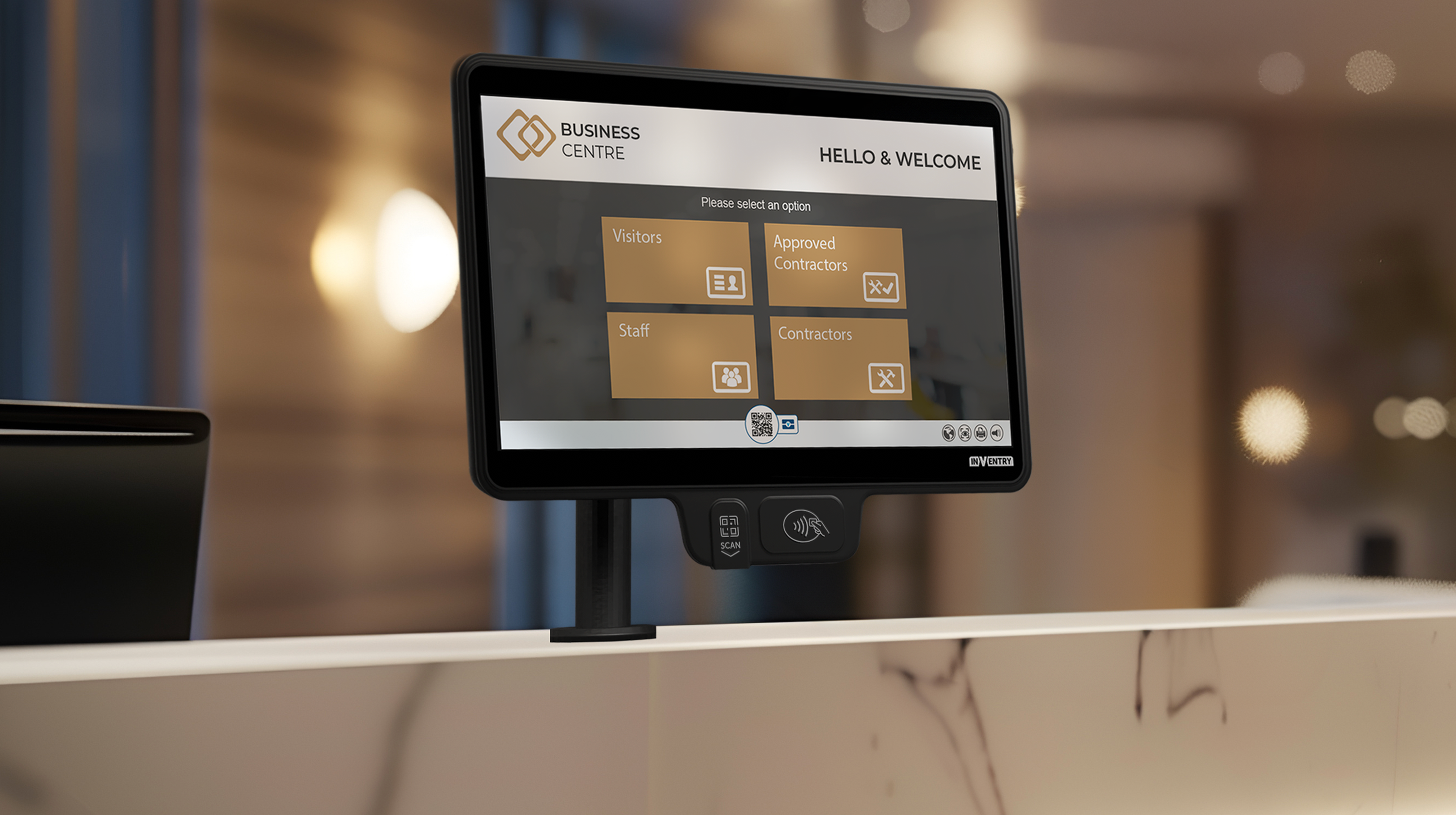
We’re passionate about the technology we create and how this impacts our customers, which is why we’ve given our screens a makeover! Here’s everything there is to know about why the Gen 6 screens are a must-have for every organisation that is looking to transform their workplace.
What is InVentry Gen 6?
InVentry Gen 6 screens are advanced visitor and sign-in management terminals designed to improve safeguarding, streamline reception processes, and provide real-time visibility of who is on-site. Used in schools and organisations across the UK, they combine integrated scanning technology, cloud connectivity, and Windows 11 performance to replace manual sign-in systems with a secure, digital alternative.
Key Features
1. Improved design
The ultra-thin 10mm display gives Gen 6 screens a modern, professional appearance that fits seamlessly into reception and front desk environments. Beyond aesthetics, the streamlined design helps organisations create a strong first impression for visitors while maintaining a clean, uncluttered sign-in area that is easy for staff and visitors to use.
2. Windows 11
Gen 6 screens now run on Windows 11, delivering improved speed, stronger security, and enhanced system performance compared to previous generations. The increased processing capability and storage capacity also help ensure smoother operation, quicker response times, and better compatibility with modern organisational IT systems.
3. Integrated Scanners
The built-in RFID and QR code scanners streamline the sign-in process for visitors, staff, and contractors by removing the need for separate external hardware. In practice, this reduces queue times at reception, simplifies daily check-ins, and supports a more compact, efficient all-in-one device design.
4. Dual camera
The integrated dual camera system improves accessibility and interaction with the screen, ensuring a smoother and more intuitive user experience. It supports clearer user recognition and helps enhance overall usability, particularly in busy reception environments where fast and accurate sign-in is essential.
5. Cloud Integration
With built-in cloud integration and a free upgrade to InVentry’s cloud platform, Gen 6 screens allow organisations to securely manage and access sign-in data from anywhere. This ensures records are always up to date, improves data visibility across multiple sites, and strengthens overall system security and reliability.
Why Choose the Gen 6?
If you’re looking to streamline your workplace the Gen 6 is a must-have for your organisation, it will transform any workplace, by increasing its effectiveness, security, and user experience through the new features such as windows 11, built-in scanners and modern design.
Corporate and Office Environments
In office environments, Gen 6 screens are used to manage visitor and contractor sign-ins at reception, replacing manual logbooks and improving front-of-house efficiency.
This creates a more professional visitor experience while reducing the workload on reception teams and improving visibility of who is on-site at any time.
Case Study: Trafford Centre – Streamlining space and reception processes
At the Trafford Centre, InVentry systems were used to improve operational efficiency, particularly around booking and managing shared spaces.
The organisation implemented InVentry to streamline processes and reduce inefficiencies caused by manual or fragmented systems. This helped staff more easily identify availability and improved overall operational flow across the site.
Multi-Site and High-Traffic Locations
For larger organisations operating across multiple locations, Gen 6 screens support standardised sign-in processes, ensuring consistent data capture across all sites.
Cloud connectivity allows central teams to access real-time information, improving oversight and helping maintain consistent processes across different locations.
Case Study: Bufab UK – Flexible multi-site sign-in management
Bufab UK implemented InVentry across multiple sites to improve flexibility and visibility in their sign-in processes.
Different locations required different operational setups, and InVentry allowed them to adapt the system accordingly while still maintaining a centralised approach to managing visitor and staff access.
This provided greater flexibility across sites while ensuring consistent control over entry requirements and onsite visibility.
Schools and Educational Settings
In schools, Gen 6 screens are used at main entrances, reception areas, and staff access points to manage the sign-in process for students, staff, visitors, and contractors. This helps maintain accurate, real-time visibility of who is on-site and supports safeguarding procedures during both normal operations and emergency situations.
By digitising the sign-in process, schools reduce reliance on manual registers and improve the speed and accuracy of daily arrivals, particularly during busy morning periods.
Case Study: Cams Lane Primary School – Improving safeguarding and reducing admin
At Cams Lane Primary School, InVentry replaced an inconsistent and time-consuming sign-in process with a digital system designed to improve accuracy and safeguarding visibility.
Previously, staff relied on manual processes that made it harder to quickly identify who was on-site, especially during busy arrival periods.
After implementing InVentry’s system, the school achieved a consistent, digital sign-in process for staff, visitors, and students. This improved safeguarding visibility and reduced administrative burden for office staff, while ensuring records were always accurate and up to date.
What Our Customers Say
At InVentry, we value customer feedback, and the response to our Gen 6 screens has been incredible! Here’s what some of our users have to say.
“The Gen 6 screen makeover is wonderful! The new ultra-thin 10mm display gives it a really fresh, modern look, and the hardware now being separate has been a great addition!”
” Having the scanners integrated to the screen is a great addition and the improved lighting has significantly boosted photo quality!”
Contact our team today to discuss your requirements and how our Gen 6 screens can help you.
FAQs – InVentry Gen 6 Screens
What are InVentry Gen 6 screens used for?
InVentry Gen 6 screens are used to manage staff, visitor, and contractor sign-ins at reception areas. They provide a digital, real-time system for tracking who is on-site, replacing manual sign-in books with a more secure and efficient process.
How do InVentry Gen 6 screens improve visitor management?
They improve visitor management by combining touchscreen sign-in, integrated scanning technology, and cloud connectivity into one system. This allows visitors to check in quickly while ensuring organisations always have accurate, up-to-date records of who is on-site.
What makes Gen 6 screens different from previous versions?
Gen 6 screens feature upgraded hardware, including a slimmer design, Windows 11 operating system, integrated RFID and QR scanners, dual cameras, and improved cloud integration. These upgrades make the system faster, more secure, and easier to use in busy reception environments.
Do Gen 6 screens work with cloud-based systems?
Yes, Gen 6 screens integrate with InVentry’s cloud platform, allowing organisations to manage sign-in data remotely. This ensures information is always up to date and can be accessed securely from multiple locations.
Are Gen 6 screens suitable for schools?
Yes, they are widely used in schools to support safeguarding, improve visitor tracking, and streamline morning arrivals. They help ensure schools have real-time visibility of everyone on site, which is important for both safety and compliance.
How do users sign in using Gen 6 screens?
Users can sign in using multiple methods depending on configuration, including QR codes, RFID cards, or touchscreen input. Once registered, their details are logged instantly into the system for real-time tracking.
What are the benefits of upgrading to Gen 6 screens?
Upgrading to Gen 6 screens improves speed, security, and usability at reception points. Organisations benefit from faster sign-in processes, improved data accuracy, reduced manual workload, and better visibility of who is on site.
Do Gen 6 screens help with safeguarding?
Yes, they support safeguarding by providing real-time records of all individuals on site. In emergencies, staff can quickly access accurate information to identify who is present in the building.